
Your files cross the room, not the world.
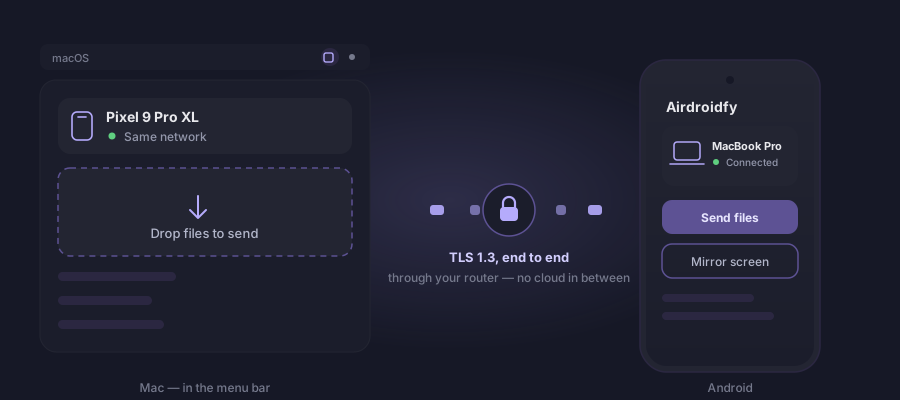
Airdroidfy moves files between your phone and your computer over your home network — Android, iPhone, Mac and Windows. It mirrors the Android screen onto the Mac or the PC, with control, turns the Android camera into the Mac's webcam, over Wi-Fi, and makes your Android tablet a second display for the Mac, by cable or over Wi-Fi, and for the PC, over Wi-Fi. No account, no cloud, no server in the path of your files.
macOS 14 or newer on an Apple Silicon Mac (M1 or newer), or Windows 11. Three days of trial, no sign-up. The phone app is free, on Google Play and the App Store, and is the other half of the pair — nothing works without both.
What the iPhone does with the Mac, your Android does too
Anyone with an iPhone and a Mac gets a set of shortcuts between the two out of the box: sending a file through the air, using the phone as a webcam, using the iPad as a second screen, seeing the phone's screen on the computer, copying on one and pasting on the other. Airdroidfy helps you do practically all of that with your Android — and a good part of it works on Windows as well.
| In the Apple ecosystem | On your Android, with Airdroidfy |
|---|---|
| AirDrop | Files both ways, with the Mac and with Windows. |
| Continuity Camera | The phone's camera as the Mac's webcam, over Wi-Fi: Meet, Zoom, FaceTime. New |
| Sidecar | Your Android tablet as a second screen for the Mac, by cable or over Wi-Fi, with touch standing in for the mouse. New |
| iPhone Mirroring | The Android screen in a window on the Mac or the PC, with touch and keyboard. |
| Universal Clipboard | Copy on the phone, paste on the Mac — and the other way round. |
| iPhone notifications on the Mac | Android notifications show up on the Mac. |
Your phone's camera becomes the Mac's webcam New
The best camera you own is usually in your pocket, not on top of your computer screen. Airdroidfy connects one to the other over Wi-Fi, with no cable: the Android joins the Mac's camera list as Airdroidfy (celular), and from then on it is a camera like any other — in Google Meet, Zoom, FaceTime and any app that lets you pick a camera.
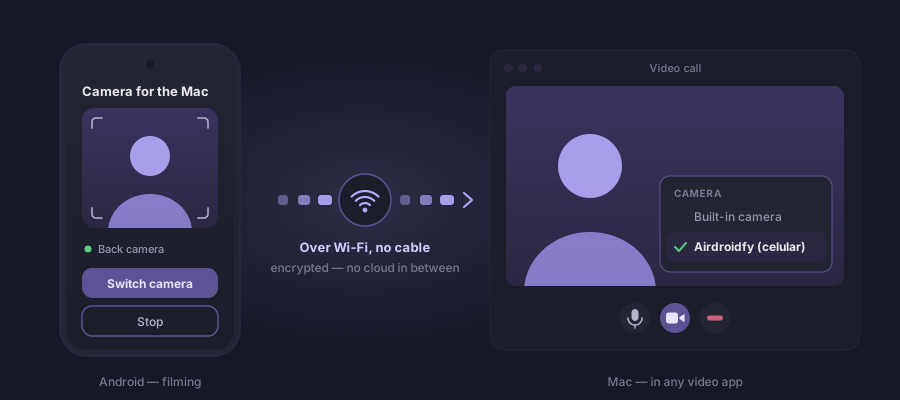
- Front or back. Switch lenses in the middle of a call, from the app or from the phone's notification.
- Only with your yes. The Mac asks, the phone prompts, and nothing is sent before you accept. Stopping is one tap.
- Only what the camera films. The phone's screen, notifications and other apps stay out of it. Sound still comes from the Mac's microphone.
- No cloud in between. The picture goes up to no server to reach the Mac — there is no server of ours it could pass through.
For now the camera exists on the Mac (Airdroidfy 0.1.17 or newer), with an Android phone (app 1.0.29 or newer). It is installed once, from the app's menu — the step by step is here.
Your Android tablet becomes a display for the Mac New
That tablet spending most of its time in a drawer is a second screen waiting to be used. Plug it into the Mac and the Mac's desktop carries on onto it: drag a window sideways and it shows up on the tablet, as with a desk monitor. Or mirror the main screen, to show something to whoever is across the table.
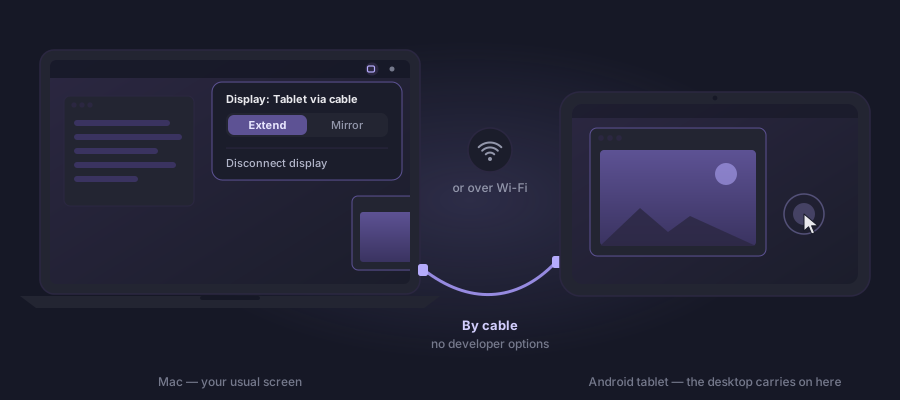
- By cable, with nothing to set up. No developer options and no USB debugging. The first time it takes three taps; after that, you just plug in the cable.
- Or over Wi-Fi. With the same pairing as always, and the Mac asks before every session.
- Touch becomes a mouse. Tap to click, two fingers to scroll, long press for a right-click — and a hovering pen moves the pointer.
- On Windows too, over Wi-Fi. The tablet mirrors the PC's main screen or shows another of its displays, with the same touch. How it works on Windows.
- Included in the licence. It is not a separate app and costs nothing more: it is the same Airdroidfy, on both sides.
It needs an Apple Silicon Mac with Airdroidfy 0.2.0 or newer, or a PC on Windows 11 with Airdroidfy 1.1.0 or newer, and a tablet (or phone) on Android 14 or newer with app 1.1.0 or newer. All about Airdroidfy Screen — the step by step, the requirements and the questions.
US$ 29.99 once, forever
The phone apps are free, on Android and iPhone. The computer apps have a 3-day trial and then ask for a licence — a single purchase, no subscription, good for two devices: two Macs, two PCs, or one of each. Changing machines? Deactivate the old one in Settings and activate the new one with the same key.
How it works
The two devices find each other on the local network over Bonjour. Pairing happens once, by comparing a short code shown on both screens — the same ritual as Bluetooth, and for the same reason: it is what proves the device on the other side is yours.
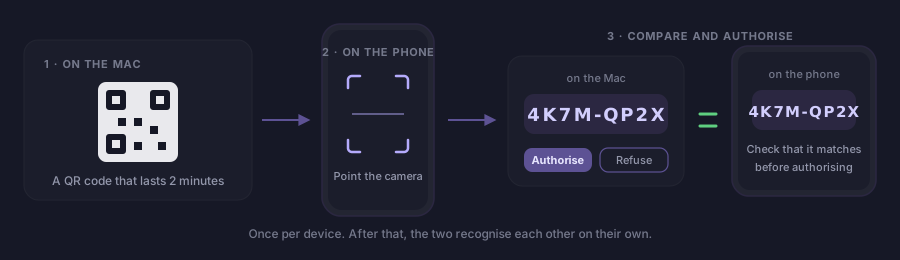
From then on, every transfer travels over a TLS 1.3 channel where both sides prove who they are with the certificate they exchanged during pairing. There is no certificate authority, no login, no username. If the certificate does not match exactly, the connection dies before the first byte.
Your files pass through no server at all. We have nowhere to keep them, because they never reach us: they leave one device and arrive at the other, through your own router. Outside the local network, the app simply does not find its peer.
The only system of ours on the internet is the one that issues and checks the licence for the computer apps. It knows a purchase e-mail and a key — never a file, never a screen, never a network of yours. The phone apps never talk to it.
What it does
- Send files both ways, between phone and computer and between two computers, with per-file integrity verification — what arrives is byte for byte what left.
- Share straight from the system: the iPhone share sheet, the Android share menu, the Finder context menu and the Windows Explorer one.
- Mirror the Android screen on the Mac and on Windows, with Android's own explicit authorization for every session.
- Remote control during mirroring: tap, drag and type on the phone from the computer, only on the local network and only with your consent.
- The phone's camera as the Mac's webcam, over Wi-Fi, in any video app — with your acceptance on the Android for every request.
- Your tablet as a display for the Mac, extending or mirroring the screen, by cable (no developer options) or over Wi-Fi, with touch standing in for the mouse; and for the PC, over Wi-Fi, mirroring the main screen or showing another of the PC's displays. Learn more.
- Universal clipboard between the Android and the Mac: what you copy on one device is ready to paste on the other, and you can turn it off per device.
- Android notifications on the Mac, while both are on the same network. It ships switched off, and nothing is stored: whatever arrives while the Mac is off the network is not delivered later.
Mirroring, control, the camera and the display are for Android. On iPhone the app sends and receives files — mirroring the system screen is not something Apple allows a third-party app to do.
Opening it the first time
On the Mac, the app is signed with a Developer ID and notarized by Apple, so it opens on a double click like any other — no warning, nothing to work around. Drag it to Applications and you're done.
On Windows, open the installer and click next through to finish — no administrator password, because it installs into your own user folder. The first time, Windows asks whether the app may talk on the private network; that permission is how the phone finds it.
On both, the icon lives in the notification area: menu bar on the Mac, system tray on Windows. There is no main window — this is a utility that stands by, not a program you open.
Questions
Write to support@airdroidfy.com.